Say Goodbye to meaningless code for Controller and Service with Spring-Data-Rest
In this article, we will introduce a convenient library, Spring-Data-Rest to eliminate your meaningless code in a Spring Boot Application. As we all know, a DB-access API will be implemented as a Controller-Service-Repository stack in a Spring Boot application coding convention. Often, there is no business logic in controllers and services, but only call the next component and return the result. It’s exactly the meaningless code. The Spring-Data-Rest can help us to eliminate it elegantly.
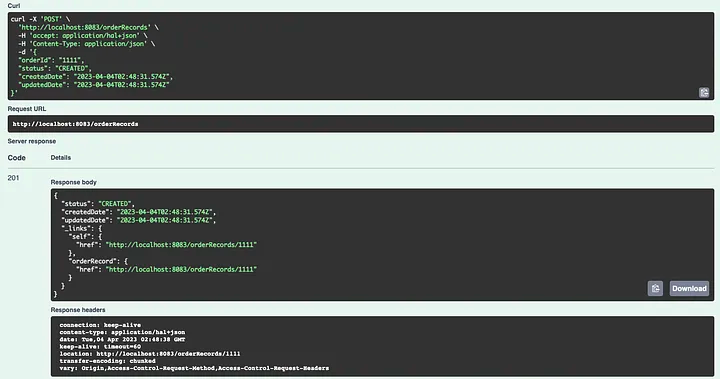
After applying the Spring-Data-Rest, we can find that the API response is formatted under the constraint of Hypermedia as the Engine of Application State (HATEOAS). There are a lot of properties that are returned with the original DB entity.
So we have to integrate Spring-HATEOAS to wrap the API-client component, then we can provide an SDK module that can be used to call the Spring-Data-Rest API endpoint with minimum effort.
The followings are what we will cover:
- Integrate Spring-Data-Rest to replace DB access APIs in a Spring Boot App
- Customize the exposed endpoint as a CQRS query-side server
- Integrate Spring-HATEOAS to build an API client module for the DB-access APIs
Let’s begin!
1. Integrate Spring-Data-Rest
Integrating Spring-Data-Rest in a Spring Boot application is a very easy thing to do as the official spring-boot-starter-data-rest exists.
so we can add the following dependency into the gradle.build:
dependencies {
    ...
    implementation 'org.springframework.boot:spring-boot-starter-data-rest'
    ...
}
then provide an entity class and the corresponding JPA-repository interface as OrderRecord.java:
@Entity
@Table(name = "ORDER_RECORD")

@Data
@AllArgsConstructor
@NoArgsConstructor
@Builder
public class OrderRecord {

    @Id
    private String orderId;

    private OrderStatus status;

    private Instant createdDate;

    private Instant updatedDate;

}
and OrderRepository.java:
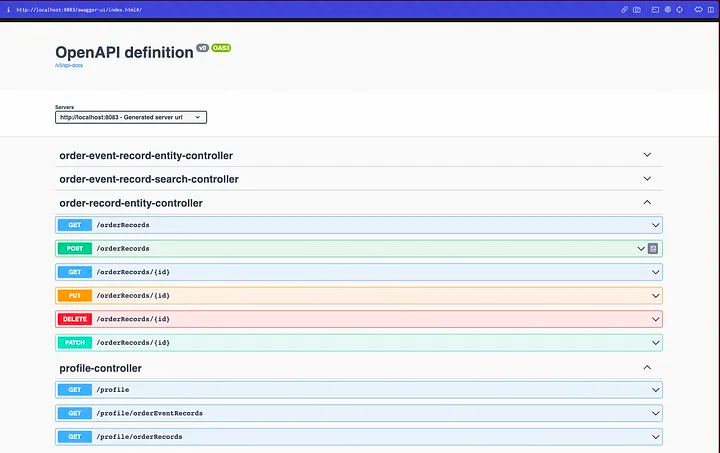
we can try the API as below:
- profile API
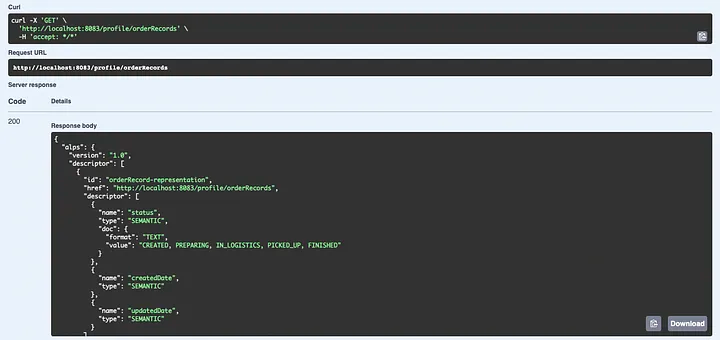
- post entity
2. Customize Endpoint
The Spring-Data-Rest default setting exposes all the endpoints (POST, GET, PUT, DELETE …) on the path the same as the entity name i.e. POST http://localhost:8083/orderRecords. Sometimes, we may want to
- hide some operations,
- expose some specific search API
- change the path of APIs
Here we will introduce how to do the mentioned customization, there are lots of other configurations that can be found in the official document.
Hide some operations
In some cases, i.g. a pure query side server in a CQRS system, will only need to expose the GET API and hide the other operation APIs. There are two ways to do that and related to some strategies to set by properties file (or .yaml) spring.data.rest.detection-strategy.
- Use the
DEFAULTstrategy (no need to set properties), and add@RepositoryRestResource(exported = false)/@RestResource(exported = false)to the repositories/ methods that don’t need to be exposed. - Use the
ANNOTATEDstrategy and add@RepositoryRestResourceto the entity that wants to be exposed, and also add@RestResource(exported = false)to methods in the repository that don’t need to be exposed. There are two strategies,ALLandVISIBILITYwhich I think are not so useful, so we skip them here.
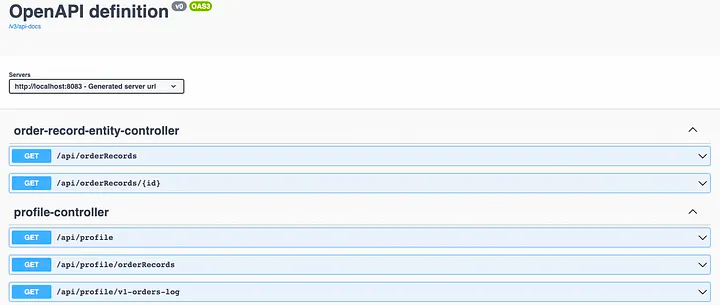
In my case, I want to disable the create, update, and delete operations for my API, so I just add the annotation to my repository and override the basic method as the documents suggest.
public interface OrderRepository extends JpaRepository<OrderRecord, String> {

    @Override
    @RestResource(exported = false)
    void deleteById(String id);

    @Override
    @RestResource(exported = false)
    OrderRecord save(OrderRecord orderRecord);

}
In this way, we can disable the API endpoint that we don’t need.
Specific search API
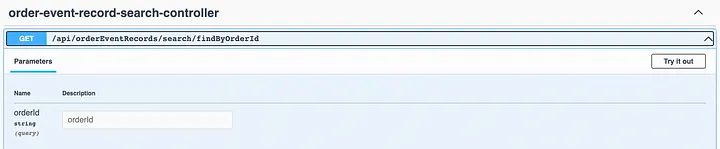
Sometimes, we will need some APIs that access the data by other fields instead of the primary key (PK). Then we need to implement some APIs like a search API. In Spring-Date-Rest, that is also covered. we can write a method in the repository class:
public interface OrderEventRepository extends JpaRepository<OrderEventRecord, Long> {
...
List<OrderEventRecord> findByOrderId(String orderId);
...
}
and the corresponding API will be generated (a GET API and the method arguments become query parameters in the request):
Change the path of APIs
The first thing we can do is change the base path of all API exposed by Spring-Date-Rest. The easiest way is to set it in the properties file (.yaml or .properties) like below:
or
or we can do it in a configuration class as the document do.
The second config is to change the path from the entity class name to our preference. The library provides an annotation @RepositoryRestResource to override all the API-path in the repository like below:
@RepositoryRestResource(path = "v1-orders", collectionResourceRel = "v1-orders", itemResourceRel = "v1-orders")
public interface OrderRepository extends JpaRepository<OrderRecord, String> {
...
}
As we can see in default, the search method will be exposed and the path of the API will be the same as the method name. we can change it by and the property in the annotation RestResource like below:
@RepositoryRestResource(path = "v1-orders-log", collectionResourceRel = "v1-orders-log", itemResourceRel = "v1-orders-log")
public interface OrderEventRepository extends JpaRepository<OrderEventRecord, Long> {
    ...
    @RestResource(path = "order-id")
    List<OrderEventRecord> findByOrderId(String orderId);
    ...
}
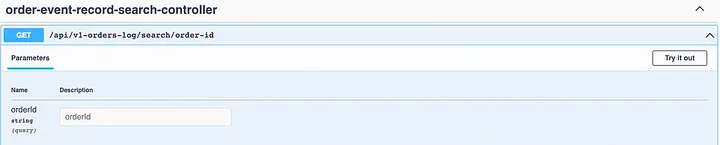
One found limitation is that the path in both @RepositoryRestResource and @RestResource is only supporting one segment (can contain -, _). In other words, we can only expose APIs on some/base/api-path/repository-path/method-path.
3. Client Module for Spring-Data-Rest API
Building an API client module is an important key to reducing efforts in a microservice system since there are a lot of scenarios in that servers will need data from other services.
Since the APIs of Spring-Date-Rest are supported by the HATEOAS format, we have to add the related dependency:
dependencies {
    ...
    implementation 'org.springframework.boot:spring-boot-starter-hateoas'
    ...
}
And add the annotation @EnableHypermediaSupport to enable it on the client config class:
@AutoConfiguration
@EnableHypermediaSupport(type = EnableHypermediaSupport.HypermediaType.HAL)
public class OrderQueryClientConfig {

// @Observed, ObservationRegistry, MeterRegistry, MicrometerObservationCapability
// MicrometerCapability is for Observability. can ignore if you didn't use it
    @Bean
    @Observed
    public OrderQueryClient orderQueryClient(ObservationRegistry observationRegistry, MeterRegistry meterRegistry) {
        Feign.Builder builder = Feign.builder()
                .logLevel(Logger.Level.FULL)
                .logger(new Slf4jLogger())
                .encoder(new JacksonEncoder(List.of(new JavaTimeModule())))
                .decoder(new JacksonDecoder(List.of(new JavaTimeModule())))
                .addCapability(new MicrometerObservationCapability(observationRegistry))
                .addCapability(new MicrometerCapability(meterRegistry));
        return new OrderQueryClient(builder);
    }

}
and then we can implement the client class (the model class can be found here, I will skip their code) :
public class OrderQueryClient {

    private final OrderQueryStub orderQueryStub;

    public OrderQueryClient(Feign.Builder builder) {
        OrderQueryStub feign = builder.target(OrderQueryStub.class, "http://localhost:8083");
        this.orderQueryStub = feign;
    }

    public V1Order get(String id) {
        return orderQueryStub.get(id).getContent();
    }

    private interface OrderQueryStub {

        String BASE_PATH = "/api/v1-orders";

        @RequestLine("GET " + BASE_PATH + "/{id}")
        @Headers("Content-Type: application/json")
        EntityModel<V1Order> get(@Param("id") String id);

    }

}
In my case, I use OpenFeign to build my API client. the differences between pure Json OpenFeign clients are:
The returns class type should be wrapped by EntityModel
(or CollectionModel for List, Map, etc. reference)
Should call getContent() to use the entity data.
Here we use the field variable OrderQueryStub to encapsulate the Feign client and hide the complex response format and only return the entity in normal usage. It’s a simple way, but ignoring the HATEOAS format, I might need a little more research on how to use it elegantly.
In this way, the client can be used by other modules. But if you’re interested in how to make it easier to use, please refer to my article on how to auto-configuration Spring Boot component. Besides, there is also an issue I encounter when consuming java.time.Instant:
- https://stackoverflow.com/questions/55028766/feign-jackson-datetime-jsonmappingexception
- https://stackoverflow.com/questions/74974924/how-to-deserialize-java-time-instant-in-jackson2jsonredisserializer
the final usage in other modules will be like below:
@Service
@RequiredArgsConstructor
@Slf4j
@LogInfo
public class OrderService {

    private final OrderQueryClient orderQueryClient;
    private final OrderEventProducer orderEventProducer;

    public String completeOrder(String id) {
        V1Order result = orderQueryClient.get(id);
        if (result.status() == V1OrderStatus.CREATED) {
            orderEventProducer.create(new OrderEvent(id, COMPLETED, Instant.now()));
            return "OK";
        } else {
            throw new RuntimeException("order(id = {}) is not in right status.");
        }
    }

}
Summary
This article introduces Spring-Data-Rest, a library that can help eliminate meaningless code, such as Controller and Service, for a pure DB access API in a Spring Boot application. It also covers how to customize the exposed endpoints, including hiding some operations, exposing specific search APIs, and changing the path of APIs. These customizations can be achieved by adding annotations and setting properties in the properties file. The article also explains how to integrate Spring-HATEOAS to wrap the API client and provide other microservices with an easier way to use those APIs.
I’ve opened the related Pull Request (PR) in my personal repository, feel free to get more details and the complete code here.
Reference
- https://docs.spring.io/spring-data/rest/docs/current/reference/html/
- https://docs.spring.io/spring-hateoas/docs/current/reference/html/
- https://stackoverflow.com/questions/30396953/how-to-customize-spring-data-rest-to-use-a-multi-segment-path-for-a-repository-r
- https://stackoverflow.com/questions/25352764/hateoas-methods-not-found